How to Register Your Business on Google: A Complete Beginner’s Guide
Introduction
If you’ve just started your business and are wondering “How do I get my business to show up on Google?” — you’re not alone. Every day, thousands of small business owners search for ways to get listed on Google Maps and appear in local search results.
Registering your business on Google isn’t just about being found — it’s about being trusted. When people search for your service, like “best coffee shop near me” or “plumber in Chicago,” Google shows verified local businesses first. By creating your Google Business Profile, you make it easier for customers to find you, contact you, and visit your store.
What Is a Google Business Profile (Previously Google My Business)?
A Google Business Profile (GBP) is a free tool from Google that helps your business appear in Google Search and Google Maps.
It shows important details like:
- Business name, address, and phone number
- Operating hours
- Website and directions
- Photos and customer reviews
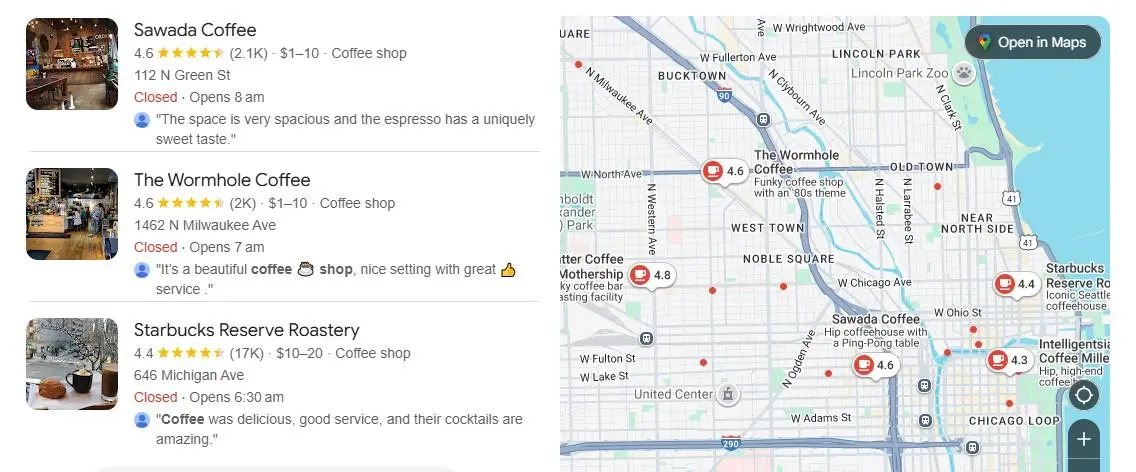
When someone searches for your business or a related service, your GBP is what appears in the local pack (the map section) — which can drive more calls, clicks, and foot traffic.
Prerequisites Before Registering Your Business
To make the registration quick and easy, have a few key business details ready beforehand:
- Business Name: Exactly as it appears on signage and documents
- Address or Service Area: Where customers can find or where you serve them
- Phone Number: Active number customers can call
- Website or Social Page: Optional but boosts credibility
- Business Category: e.g., beauty salon, restaurant, electrician
Having this information prepared ensures a smooth setup process.
Step-by-Step Guide: How to Register Your Business on Google
Step 1: Go to Google Business Profile
Visit google.com/business and click “Manage Now.” Sign in using your Google account (preferably one dedicated to your business).
Step 2: Enter Your Business Name
Type your official business name. If it doesn’t appear in the suggestions, click “Add your business to Google.”
Step 3: Select the Right Category
Choose a category that best fits your business, such as “Bakery,” “Digital Marketing Agency,” or “Dental Clinic.” This helps Google understand what kind of customers to show your listing to.
Check out the full article: How to Choose the Right Business Category on Google Business Profile
Step 4: Add Your Business Location or Service Area
If customers visit your shop or office, enter your physical address. If you offer home services or deliveries, choose “I deliver goods and services to my customers” and add your service areas.
Step 5: Add Contact Details
Include your phone number, website URL (if available), and other relevant contact details. Make sure the information matches what’s on your website and social profiles for consistency.
Step 6: Verify Your Business
Google will ask you to verify your business, usually via postcard, phone, or email. Verification confirms that your business is legitimate and gives you control over your listing.
Step 7: Optimize Your Profile
Once verified, fill out every section of your profile — add business hours, photos, services, and a detailed description. The more complete your profile, the higher your chances of ranking in local search results.
How to Verify Your Business on Google
Verification is an essential step to activate your listing. You may receive a postcard by mail containing a 5-digit code that you’ll enter in your account.
Other verification methods include:
- Phone verification: Available for select businesses.
- Email verification: For businesses with a verified domain email.
- Instant verification: If you’ve already verified your website with Google Search Console.
If your postcard doesn’t arrive, you can request a new one or contact Google Support.
For full details, check our blog: How to Claim Your Google Business Profile: Step-by-Step Guide
Tips to Optimize Your Google Business Profile
Once your business is live on Google, don’t just stop there — optimization is key to getting noticed. Here’s how:
- Upload high-quality photos and videos of your business.
- Write a keyword-rich description like “family-owned Italian restaurant in downtown Austin.”
- Collect customer reviews — and respond to them!
- Post regular updates and offers using the “Posts” feature.
- Keep hours and details updated, especially on holidays.
When you optimize your profile, you don’t just boost visibility — you also earn the trust of people searching for your services.
How Long It Takes for Your Business to Appear on Google
After verification, it usually takes 24–72 hours for your business to appear on Google Search and Maps. However, it can take longer depending on your location and category. Make sure your listing follows Google’s guidelines to avoid any delays.
Common Mistakes to Avoid During Registration
- Using a fake or keyword-stuffed business name
- Adding a virtual address or PO Box
- Choosing the wrong business category
- Creating duplicate listings
- Ignoring Google’s verification emails
Stay authentic and accurate — Google rewards real, consistent information.
Benefits of Registering Your Business on Google
- Appear on Google Maps & Search Results
- Get more calls and website visits
- Collect and manage customer reviews
- Boost your local SEO ranking
- Access insights about how customers find you
It’s a free, simple, and powerful way to grow your local presence.
Frequently Asked Questions (FAQ)
Do I need a physical address to register?
No, service-based businesses can list a service area instead of a specific address.
Is it free to register my business on Google?
Yes! Google Business Profile is completely free to use.
Can I manage multiple business locations?
Absolutely. You can add and manage all your business branches under one Google account.
How do I edit my business info later?
Log in to your Google Business Profile dashboard and click “Edit Profile.” You can update your hours, photos, services, and more anytime.
Conclusion
Registering your business on Google is one of the easiest and most effective ways to attract more local customers. It doesn’t cost a thing, yet the visibility it gives can make a world of difference for your brand.
So, don’t wait — head over to google.com/business, register your business today, and let your customers find you on Google Search and Maps!